
ReferenceControl Mapping
Mapping Layers
Reference for named, toggleable mapping layers.
Layers group mappings so a whole set can be switched on and off together. That is how one control surface does different things at different points in a show.
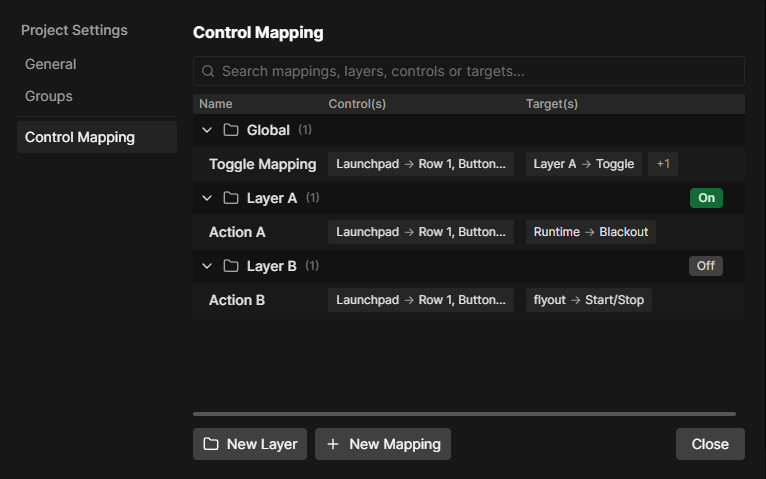
The global layer
The global layer always runs and cannot be turned off, renamed or deleted. Mappings that should work everywhere belong here.
Custom layers
New Layer creates one. Mappings inside a layer only run while it is active, shown by the On and Off button on the layer row.
| Action | How |
|---|---|
| Create | New Layer in the footer |
| Rename | Right-click the layer, Rename |
| Activate or deactivate | The On/Off button, or Activate in the context menu |
| Add a mapping to it | Right-click the layer, Add Mapping here |
| Move a mapping into it | Drag the mapping row onto the layer |
| Reorder | Drag layer rows |
| Delete | Right-click, Delete |
Deleting a layer deletes every mapping inside it.
Switching layers live
The Mapping Layer target activates, deactivates or toggles a layer, so a button or key can swap layers mid show.
Put the layer switching mappings in global, otherwise you can end up in a layer with no way back out.
What layers are good for
- One layer per song, holding the scene buttons for that song.
- A programming layer with tricks and actions, switched off during the show.
- A shift layer, where holding one button turns a second layer on and gives every button a second meaning.