
Top Toolbar
Reference for every button in the top toolbar, from left to right.
The top toolbar holds the actions you reach for constantly during programming and during a show. It sits above the panels and is always visible.
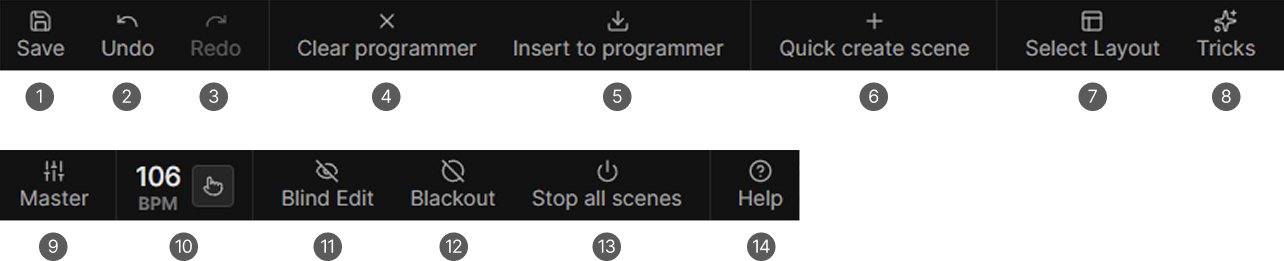
- Save
- Undo
- Redo
- Clear programmer
- Insert to programmer
- Quick create scene
- Select Layout
- Tricks
- Master
- BPM display and Tap and Sync
- Blind Edit
- Blackout
- Stop all scenes
- Help
Prepare Mode sits left of Blind Edit when it is enabled in the settings, and is not on the map above.
Items 1 to 8 sit on the left, the rest are pushed to the right edge. On a narrow window the toolbar scrolls sideways and arrows appear at the edges.
Project
Save
Saves the project.
Undo and Redo
Step through the project history. Both grey out when there is nothing to step to.
Not every action is undoable, and the undo history is cleared when you load a project.
Programmer
Clear programmer
Empties the programmer's values and effects. This is the button you press before playing a new scene.
Insert to programmer
Pulls the values of the running scenes into the programmer so you can edit them.
Scenes
Quick create scene
Creates a scene and stores the current programmer as its first step in one action, without asking for a name.
Workspace
Select Layout
Opens the layout picker with the six built-in layouts and your saved ones. See Layout and Windows.
Tricks
Opens the Tricks drawer. See Tricks Reference.
Live control
Master
Opens the Masters window. See Masters.
BPM and Tap and Sync
The tempo of the project's beat master, with four ways to set it:
| Input | Result |
|---|---|
| Click the number | Type a tempo and press Enter |
| Drag the BPM label sideways | Scrub the tempo |
| Mouse wheel over the number | Step the tempo |
| The tap button | Tap and sync |
Tapping averages your taps from the last three seconds and needs at least two. The tap button's border flashes on every beat. The range is 1 to 360 BPM.
Prepare Mode
Only shown when Show Prepare Mode buttons in toolbar is on in Settings under General. It parks the running programmer and gives you an empty one to build in, and while it is on the button is replaced by Clear and Execute.
The same buttons live in the Tricks window either way. See Use Prepare Mode.
Blind Edit
Suppresses programmer and timeline preview output, so you can build a look without it showing live.
Blackout
Forces every intensity to zero after rendering, so no light is on. Highlight and Lowlight are suppressed too. The footer shows a red BLACKOUT warning.
Stop all scenes
Stops every running scene at once. Each one fades out with its own fade out time.
Press Stop all scenes again to stop them immediately.
Help
Opens the online documentation in your browser.