
Patch Panel
Reference for the fixture properties panel and the patch dialog.
The Patch panel shows the properties of one selected fixture and holds the button that patches new ones. It works together with Patch Universe and the Patchlist.
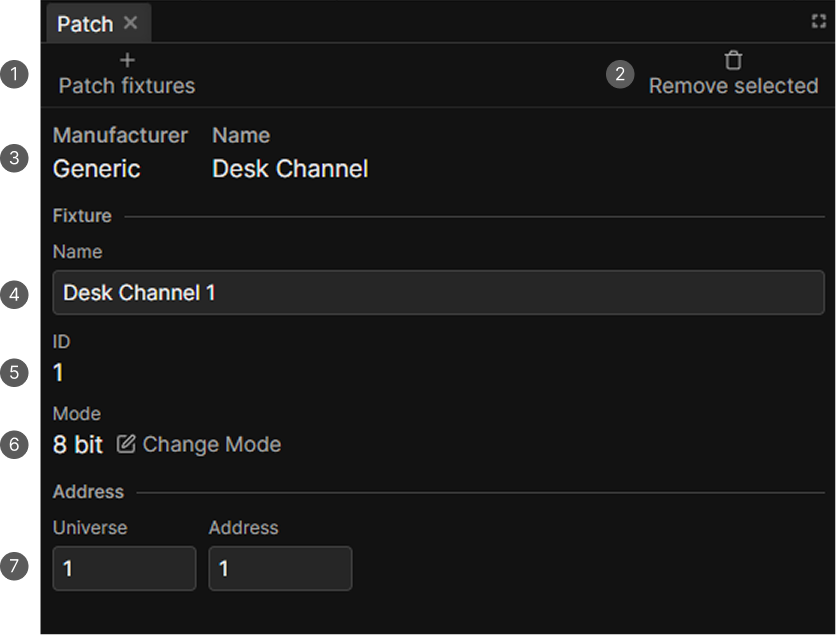
- Patch fixtures. Opens the patch dialog.
- Remove selected. Deletes the selected fixtures.
- Manufacturer and Name of the fixture definition.
- Name. The fixture's own name.
- ID. Its number in the patch list.
- Mode and Change Mode.
- Universe and Address.
Toolbar
| Control | What it does |
|---|---|
| Patch fixtures | Opens the patch dialog |
| Remove selected | Deletes the selected fixtures. Only visible with a selection |
Removing a fixture takes it out of everything at once: scenes, groups, presets, stageviews, the programmer and any group masters.
Fields
The panel needs exactly one fixture selected.
The manufacturer and the definition name come from the fixture definition and cannot be changed. Below them:
| Field | Editable | Notes |
|---|---|---|
| Name | Yes | The name shown everywhere else in the app |
| ID | Via Patchlist | The fixture's index in the patch |
| Mode | Via Change Mode | Opens Edit Mode, pick a mode and press Save |
| Universe | Yes | From 1 |
| Address | Yes | From 1, limited by the fixture's channel count |
Edits are saved automatically.
If a fixture's address collides with another, a red Address overlapping warning appears under the address fields.
Changing the mode changes how many channels the fixture uses. If another fixture sits directly behind it, the new mode can overlap it, so check the address afterwards.
Disable subfixtures
A fixture whose definition has a matrix gets a Disable subfixtures switch below the address fields. Turning it on makes the device behave like a plain fixture again, with one selection and one set of Functions cards instead of one per pixel.
If values or references are already stored on its Subfixtures, nextDMX says how many it found and asks before moving them onto the fixture itself. See Subfixtures.
The patch dialog
Patch fixtures opens a dialog with two steps. See Patch Fixtures for a detailed walkthrough.
Choose Fixture
Pick the manufacturer on the left and the fixture on the right. The search field always filters manufacturers, and filters fixtures too while All manufacturers is selected. Clicking a fixture goes to the next step.
Fixture Details
| Field | Default | Notes |
|---|---|---|
| Mode | The first mode | Each option shows its channel count |
| Name | The fixture's definition name | When patching multiple fixtures, names are suffixed with numbers, e.g. Par 1, Par 2 |
| Universe | 1 | |
| Address | The next free address | |
| Amount of fixtures | 1 | Limited by what fits in one universe |
| Gap between addresses | 0 | Extra channels left free between fixtures |
| Create new group | Off | |
| Name of new group | The fixture's definition name |
As long as you do not type an address yourself, the app keeps looking for the next free block that fits the whole batch of fixtures including its gaps, and moves on to the next universe when the current one is full.
Patching several at once numbers the fixtures, so Par becomes Par 1, Par 2 and so on.