
ReferenceEffects
Curve Effect
Parameters of the curve effect.
The Curve effect drives one or more channels along a shaped curve over time. It works on any channel.
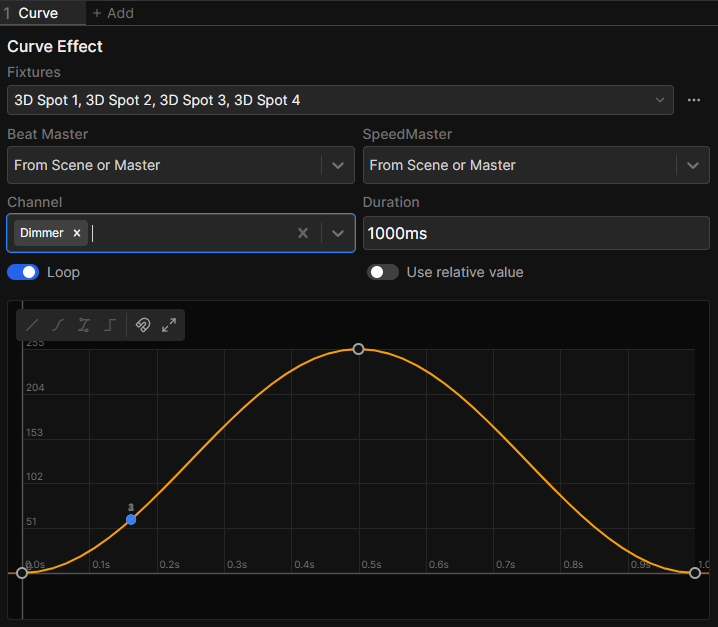
Parameters
| Parameter | Default | What it does |
|---|---|---|
| Channel | None | The channels the effect drives. Each one gets its own curve |
| Duration | 2000 ms | Length of one full cycle, in time or beats |
| Loop | On | Off plays the curve once instead of repeating |
| Use relative value | Off | Blends the curve from the channel's current value instead of overwriting it |
| Restart | Replays the curve. Only shown while Loop is off |
Use relative value uses HTP blending.
The curve editor
The horizontal axis is time across the duration, the vertical axis is the channel value from 0 to 255.
While the effect is selected, a numbered preview marker per fixture runs along the curve.
Shared settings
A Curve effect also has Fixtures, Beat Master and SpeedMaster at the top of its editor. See the Effects Panel.
Running the effect once
Turning Loop off makes the curve a one-shot, you can reset it with Restart.