
Position Effect
Parameters of the 2D position effect.
The 2D Position effect moves pan and tilt along a path.
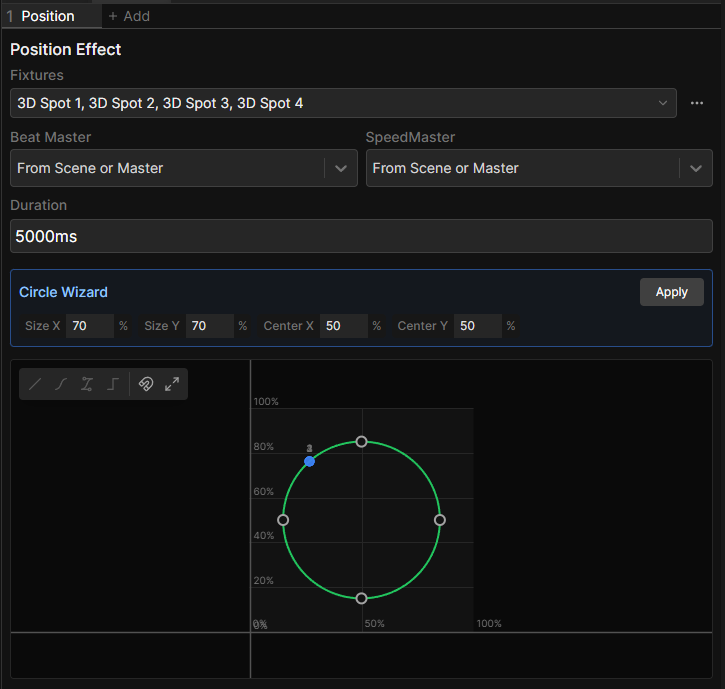
Parameters
| Parameter | Default | What it does |
|---|---|---|
| Duration | 5000 ms | Length of one full trip around the path, in time or beats |
| Path editor | The shape itself. Horizontal is pan, vertical is tilt, both as a percentage of the fixture's range |
The effect automatically takes fine channels into account, so a fixture with 16-bit pan and tilt will move smoothly along the path.
The position wizard
Starting from the Circle or Eight preset gives you a wizard, so you can shape it easily.
| Field | What it does |
|---|---|
| Size X | Width of the path |
| Size Y | Height of the path |
| Center X | Where it sits in the pan range |
| Center Y | Where it sits in the tilt range |
| Rotation | Turns the path. Figure-eight only |
Apply bakes the shape into editable points. Editing points directly does the same, after which the wizard disappears.
Shared settings
A Position effect also has Fixtures, Beat Master and SpeedMaster at the top of its editor. See the Effects Panel.
Spreading the effect across fixtures
On its own, every fixture moves the same path at the same time. Select the effect and raise Phase in the Functions panel to offset the fixtures. Typing 0..360-360/n spreads it evenly across the whole selection.
See Set Fixture Values for more on fanning values across a selection.