
Patch Universe
Reference for the channel grid of a single universe.
Patch Universe shows all 512 channels of one universe as a grid, 25 channels per row. It is the fastest way to see what is addressed where and to find free space.
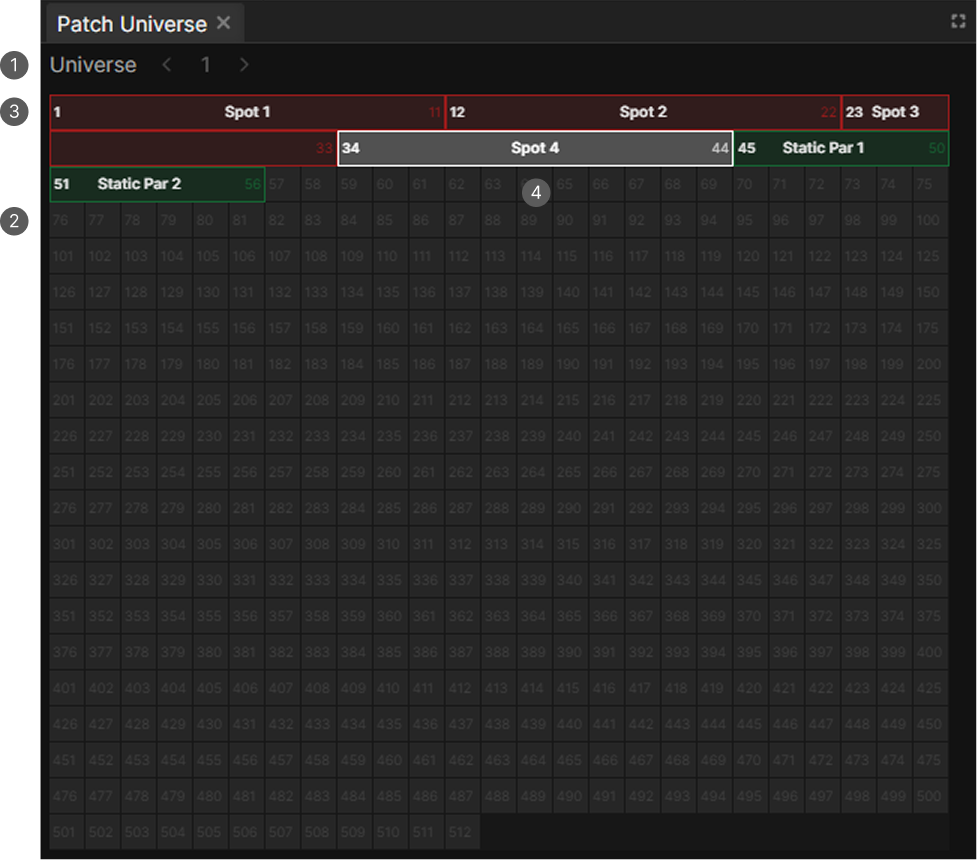
- Universe selector. Arrows and a number input.
- Empty channel with its channel number.
- Fixture block with its start channel, name and end channel.
- Selected fixture, outlined in white.
The grid
Empty channels show their number. A patched fixture fills its channels as a colored block, labeled with its start channel, its name and its end channel.
Fixtures of the same type share a color.
Choosing the universe
The arrows change through universes and the input field takes a number directly, from 1 to 100.
While something is selected, the panel follows the selection instead and the controls are disabled.
Selecting
| Action | Result |
|---|---|
| Click a fixture | Selects only that one |
| Ctrl or Shift click | Adds it to or removes it from the selection |
| Click an empty channel | Clears the selection |
Re-addressing by dragging
Drag a fixture block to move it to another address. You can also drag a selection of several fixtures at once.
Dragging only moves fixtures within the universe shown. To move a fixture to another universe, use the address fields in the Patch panel.