
Property Matrix
Tabular inspector for viewing and editing channel values, active states and effects across fixtures in steps, presets and the programmer.
The Property Matrix is a dedicated inspector dialog designed for tabular editing of fixture data. Instead of reloading looks back into the Programmer to adjust individual values, the Property Matrix allows direct editing of channel values and fixture selection.
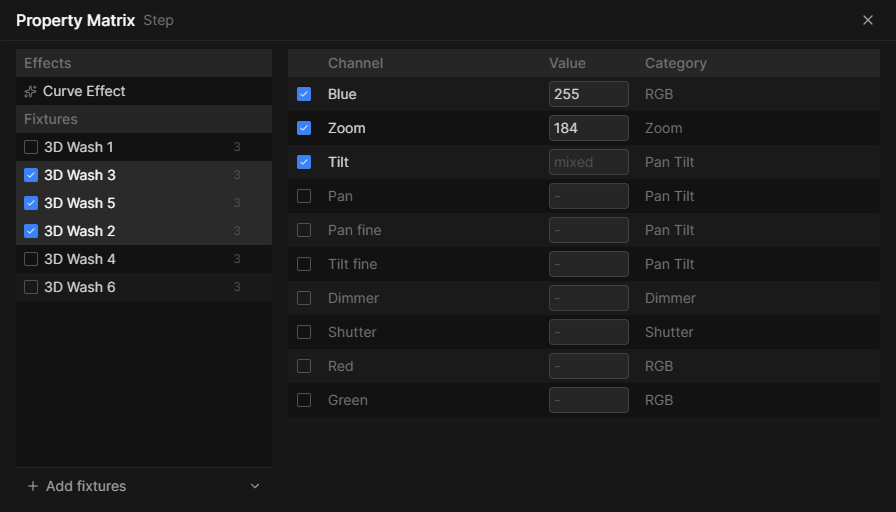
Overview
The Property Matrix layout is split into two primary areas:
- Effects & Fixture Sidebar (left): Shows active effects associated with the selection, lists all involved fixtures, and provides controls to toggle or add fixtures.
- Channel Matrix Table (right): Displays channels and the current values for all selected fixtures.
Accessing the Property Matrix
You can open the Property Matrix from several places:
- Scene Steps: Right-click any step in the Scene panel and select Edit Property Matrix.
- Presets: Right-click a Value/Effect Preset in the Presets panel and select Edit.
- Programmer: Click Edit -> Programmer Property Matrix in the application menu.
Multi-Fixture Editing (mixed values)
When multiple fixtures are checked in the sidebar and share identical values, the exact value is displayed. If their values are different, the field displays mixed. Entering a new number into a mixed field overwrites that channel with the new value across all currently checked fixtures.