
Script View
Reference for the script editor, its cue blocks and reading aids.
Script View holds the running text of a show: a rundown, a script, a set list. Cue markers sit inside the text, so an operator can follow along and see what is coming.
The Script View will be improved in the future as it does not follow the latest UI and UX standards set by the rest of the app. This does not mean the current Script View is broken, it works fine and is fully functional, but it is not as easy to use and as practical as it could be.
The audio files are currently not included in project exports.
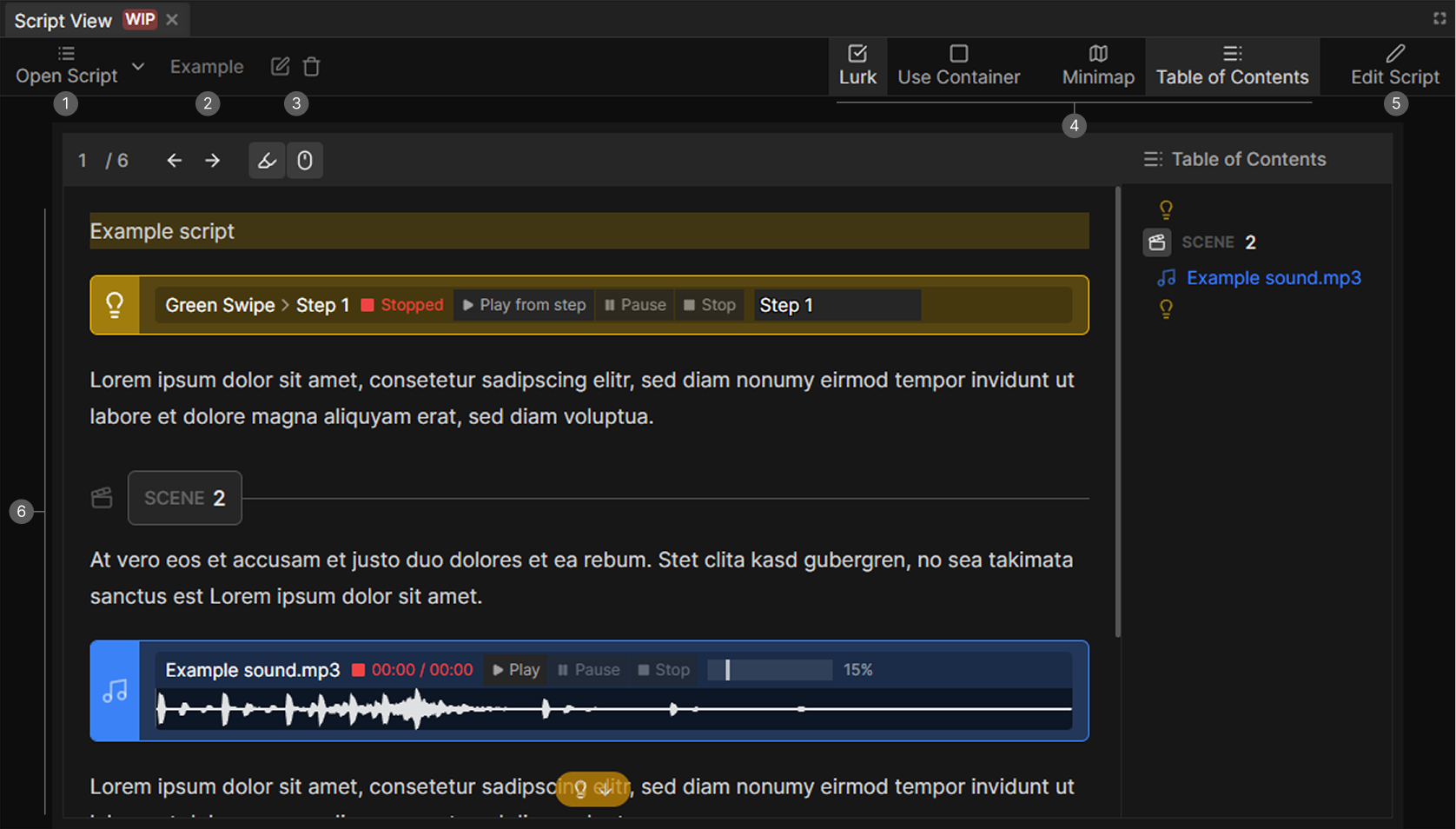
- Open Script. Switches between scripts and creates new ones.
- Script name.
- Rename and Delete.
- Reading toggles. Lurk, Use Container, Minimap, Table of Contents.
- Edit Script. Switches between reading and editing.
- The document, with its blocks.
Scripts
Scripts are stored in the project. Open Script lists them with a search option and has a New page entry to create one. The buttons next to it rename and delete the current script.
Edits save on their own while you type.
View and edit mode
Edit Script switches into editing, Stop Editing leaves it. In view mode the document is read-only and tuned for following live, which is also the only mode where Lurk works.
In edit mode you get normal rich text: headings, alignment, bold and the rest.
Cue blocks
Cue blocks are inserted into the text and stand out from the rest:
| Block | Purpose |
|---|---|
| Light cue | Marks a lighting moment, and can point at a scene and step |
| Audio cue | Marks an audio moment, and can point at an audio file for playback |
| Message cue | A note for the operator |
| Warning cue | Something to watch out for |
Three dividers structure a long document: Page, Scene and Cue.
Reading aids
| Toggle | What it does |
|---|---|
| Lurk | Shows floating indicators for upcoming light, audio, warning and message cues while you scroll. View mode only |
| Minimap | A narrow overview of the whole document |
| Table of Contents | A navigable list built from the headings |
| Use Container | Constrains the text to a comfortable reading width |