
Patchlist
Reference for the fixture list with its groups, search, sorting and folders.
The Patchlist is the full list of patched fixtures, with a group bar, search, sortable columns and folders. It is the panel to use when you want to select by name rather than by position.
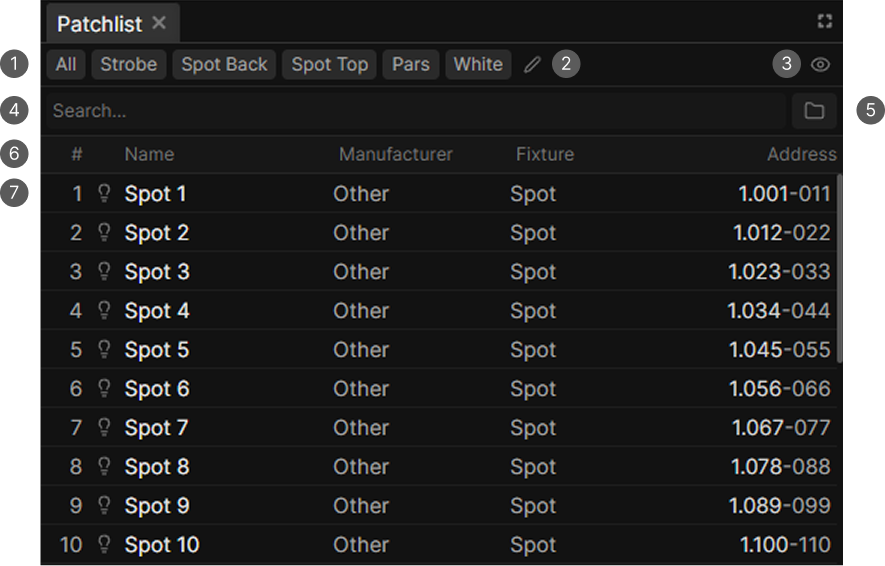
- Group bar. All, groups and folders.
- Edit groups.
- Show only selected toggle.
- Search field.
- Create folder.
- Column headers, which also sort.
- Fixture row.
Search and columns
The search field matches the fixture name, the manufacturer, the fixture definition name and the address written as universe.channel.
| Column | Sorts by |
|---|---|
| # | The fixture's position in the patch |
| Name | Name |
| Manufacturer | Manufacturer |
| Fixture | Fixture type |
| Address | Universe and channel |
Click a header to sort, click it again to reverse. The address column reads as 1.001-016, which is universe, start channel and end channel.
Selecting
Click selects, Ctrl-click toggles, Shift-click selects a range, and Shift with the mouse wheel steps the selection through the list.
Fixtures in the ghost selection are marked with a dashed background.
Organizing
Drag rows to reorder them or to drop them into a folder. Dragging several selected rows moves them together.
Dragging only works while the list is sorted by #. Under any other sort the order you see is not the stored order, so reordering is disabled.