
Simple Scene Control
Reference for the scene playback panel.
Simple Scene Control is a compact surface for running scenes during a show. It plays and monitors but it does not edit.
This panel is deprecated and will be removed in a future release.
The Simple Scene Control panel was a temporary solution to easily play scenes. ControlDecks and ControlMappings are now a way better way to control scenes, and the Simple Scene Control panel will be removed in a future release.
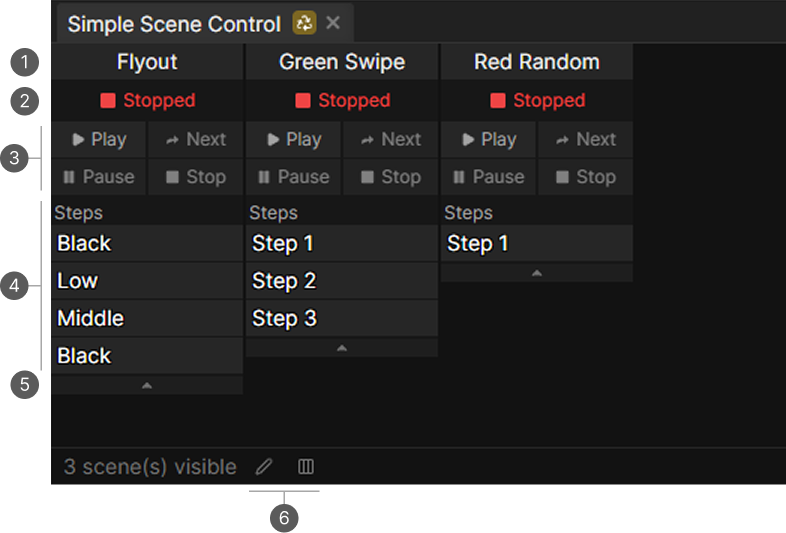
- Scene name.
- Scene playback state.
- Transport buttons.
- Steps list with the progress bar on the running step.
- Expand arrow.
- Select visible scenes and the layout toggle.
Scene cards
Every scene you choose to show gets a small card.
| Playback State | Meaning |
|---|---|
| Stopped | Not running |
| Playing | Running through its steps |
| Paused | Paused on the current step |
| Stopping | Fading out |
The running step shows a progress bar for its fade and its hold time.
Transport
| Button | Available when |
|---|---|
| Play | Stopped or paused |
| Next | Playing or paused |
| Pause | Playing |
| Stop | Playing or stopping |
Card size
The arrow on a card expands it to the full step list or collapses it to just the current step. On a busy show, collapsed cards are visually more compact.
Choosing what is shown
Select visible scenes picks the subset of scenes on the panel. The data is stored with the layout, so different layouts can show different sets.
To save the visiable scenes, save a custom layout. The default layout always shows all scenes.
The layout button switches the cards between a horizontal and a vertical arrangement.
Related
- Scenes Panel for creating and editing scenes.
- Map MIDI and Keyboard to bind the transport buttons.